Not technical? Skip to the part where we explain it like Apple never would.
The Setup
This is not a theory. This is a documented, timestamped, terminal-verified investigation conducted on a MacBook Pro (Mac16,6, macOS 15.7.4) on March 26, 2026.
The machine belonged to a developer and performance marketer who had:
- Explicitly disabled iCloud services in System Settings
- Turned off Siri, Find My, Photos, Messages, Mail, Notes, Keychain Sync, and iCloud Drive
- Enabled Advanced Data Protection
- Signed out of iCloud entirely
What happened next is the story.
It Started With a Ghost IP
A single outbound connection showed up in a firewall log:
17.248.193.57:443  HTTPS  Apple Inc  Los Angeles  10 hits
BINARY: /usr/libexec/networkserviceproxy
One destination. Ten hits. No PTR record.
A reverse DNS lookup returned NXDOMAIN. No record exists. But the SOA record exposed ns-ext-prod.jackfruit.apple.com, Apple’s own internal nameserver infrastructure. This endpoint was deliberately made un-fingerprintable. Apple chose not to give it a reverse DNS record. That is not an accident.
We covered this endpoint in detail in The Silent Pipe. What follows is what happened when we pulled the thread further.
What networkserviceproxy Actually Does
Apple calls it a local proxy layer for sandboxed apps and network extensions.
fs_usage told a different story. During a 3-second capture window, the following processes fired simultaneously and were actively writing data:
| Process | Data Being Written |
|---|---|
identityservicesd |
Identity tokens and push credentials |
cloudd |
CloudKit metadata and sync state |
remindd |
Three separate Reminders SQLite stores |
contactsd |
Contacts database, three concurrent instances |
locationd |
consolidated.db, encrypted location caches, gyroscope calibration |
routined |
Cloud-V2.sqlite, behavioral routine model, pattern-of-life data |
contextstored |
knowledgeC.db, CoreDuet behavioral knowledge graph |
searchpartyd |
iCloud search index sharing keys |
nsurlsessiond |
Two active HTTP task queue instances |
networkserviceproxy was receiving small fixed-size control messages (48 to 56 bytes) at roughly 180ms intervals on a single socket. A structured heartbeat channel. It held a map_fd call passing socket handles between processes and an NPOLICY file descriptor registering itself with the kernel’s network policy engine.
Every data-collecting daemon routes its outbound connections through networkserviceproxy. None of them show a direct outbound connection in your firewall. Only the proxy does. It is a single process that launders the network identity of a dozen data-collecting daemons.
Then We Found callservicesd
/System/Library/PrivateFrameworks/TelephonyUtilities.framework/callservicesd
Real Memory:    2.34 GB
Private Memory: 2.05 GB
Ports:          418
PID:            765
A telephony daemon holding 2.34 GB of private memory and 418 Mach IPC ports.
The lsof output told the real story. callservicesd had loaded:
- Every contact source: CardDAV, LocalSource, LDAP, Exchange, DirectoryServices
AddressBookCore.framework, complete contacts infrastructureIMCore.framework, iMessage core frameworkContacts.framework, full contacts APICallHistory.storedata-wal, a 3.01 MB write-ahead log actively growingGeoServicescache, location and geo lookupsanalyticsd/events.allowlist, analytics event filteringLaunchServicesstore, application registry
Its stderr (FD 2) had written 1.38 MB of output to /dev/null. Silently discarded. It held an NPOLICY network policy file descriptor registering itself with the kernel network layer.
This is not a call relay daemon. This is a communications intelligence aggregator holding your entire contact graph, message infrastructure, call history, and location data in private memory, communicating through 418 Mach IPC channels invisible to any firewall.
The Opt-Out File
We captured Apple’s own service configuration:
defaults read MobileMeAccounts > icloud_service_states.txtThe file confirmed explicit opt-outs with Enabled = 0:
- iCloud Drive
- Photos
- Messages
- Notes
- Siri
- Freeform
- Keychain Sync
- Find My Mac
- News, Stocks, Home
Then there were the services with no Enabled flag at all. No opt-out mechanism exposed to the user:
- Contacts
- Calendar
- Reminders
- Bookmarks
- PhoneFaceTime
- Settings Sync, syncing your system settings to Apple with no visible disable option
Nowhere in that file: any entry for routined, contextstored, or behavioral intelligence sync. Apple never gave you the option to opt out of those. They do not appear in the UI because they were never exposed as user-controllable services.
The Signout Test
We signed out of iCloud entirely. Advanced Data Protection enabled. Kept nothing local. Full account dissociation.
Process list before signout:
26166   cloudd
973     networkserviceproxy
25436   identityservicesd
765     callservicesd
25551   routined
25600   contactsd
Process list after signout:
46374   cloudd               ← new PID, restarted immediately
973     networkserviceproxy  ← SAME PID, never stopped
46489   identityservicesd    ← new PID, restarted immediately
765     callservicesd        ← SAME PID, never stopped
46695   routined             ← new PID, restarted immediately
46732   contactsd            ← new PID, restarted immediately
networkserviceproxy and callservicesd never stopped. The others cycled and immediately restarted.
Signing out of iCloud did not stop a single daemon.
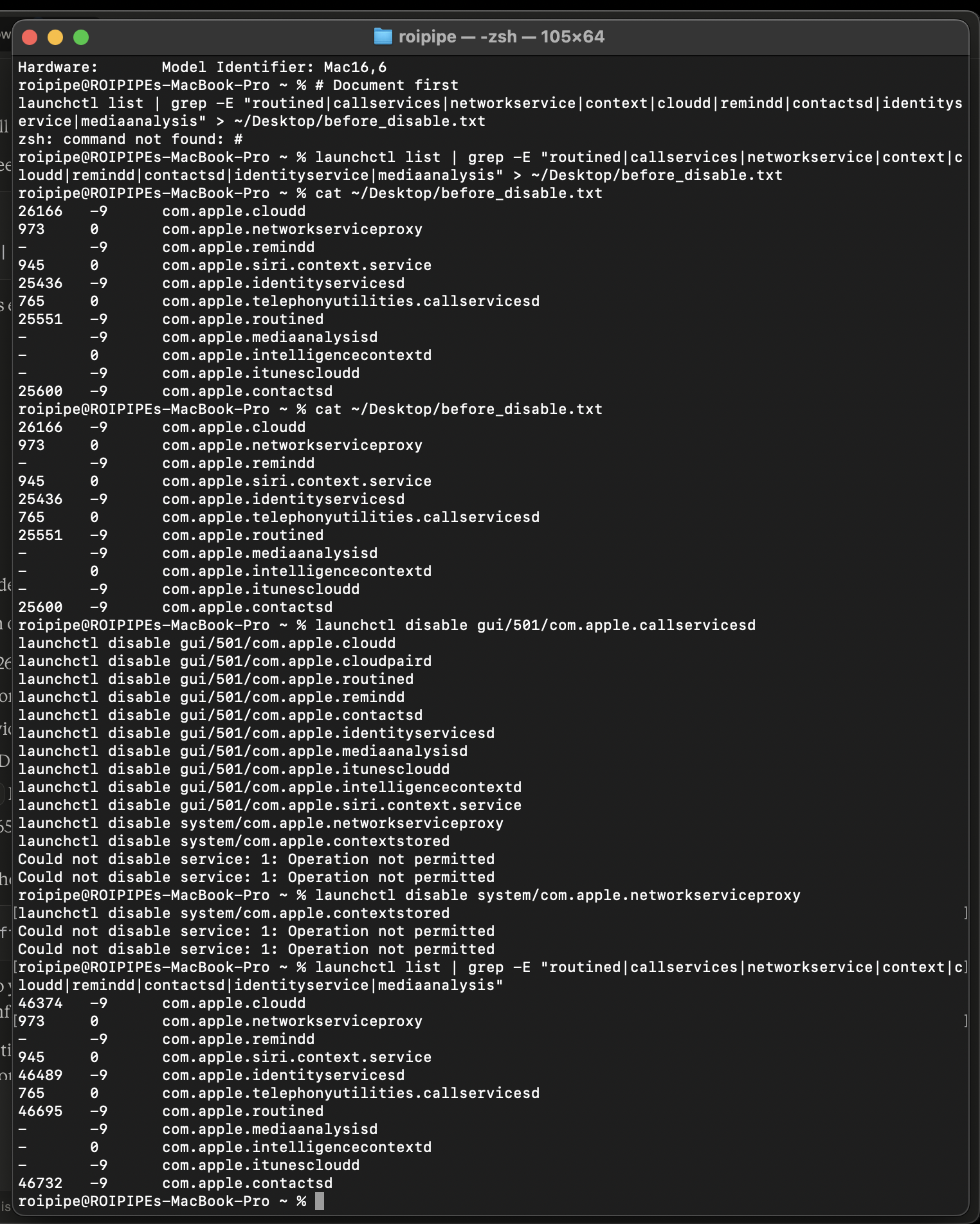
Terminal capture: process list before and after iCloud signout, followed by SIP-blocked disable attempts.
The Fresh Boot Test
Someone could argue the daemons were residual from a previous session. So we restarted the machine. Full power cycle. No iCloud account signed in.
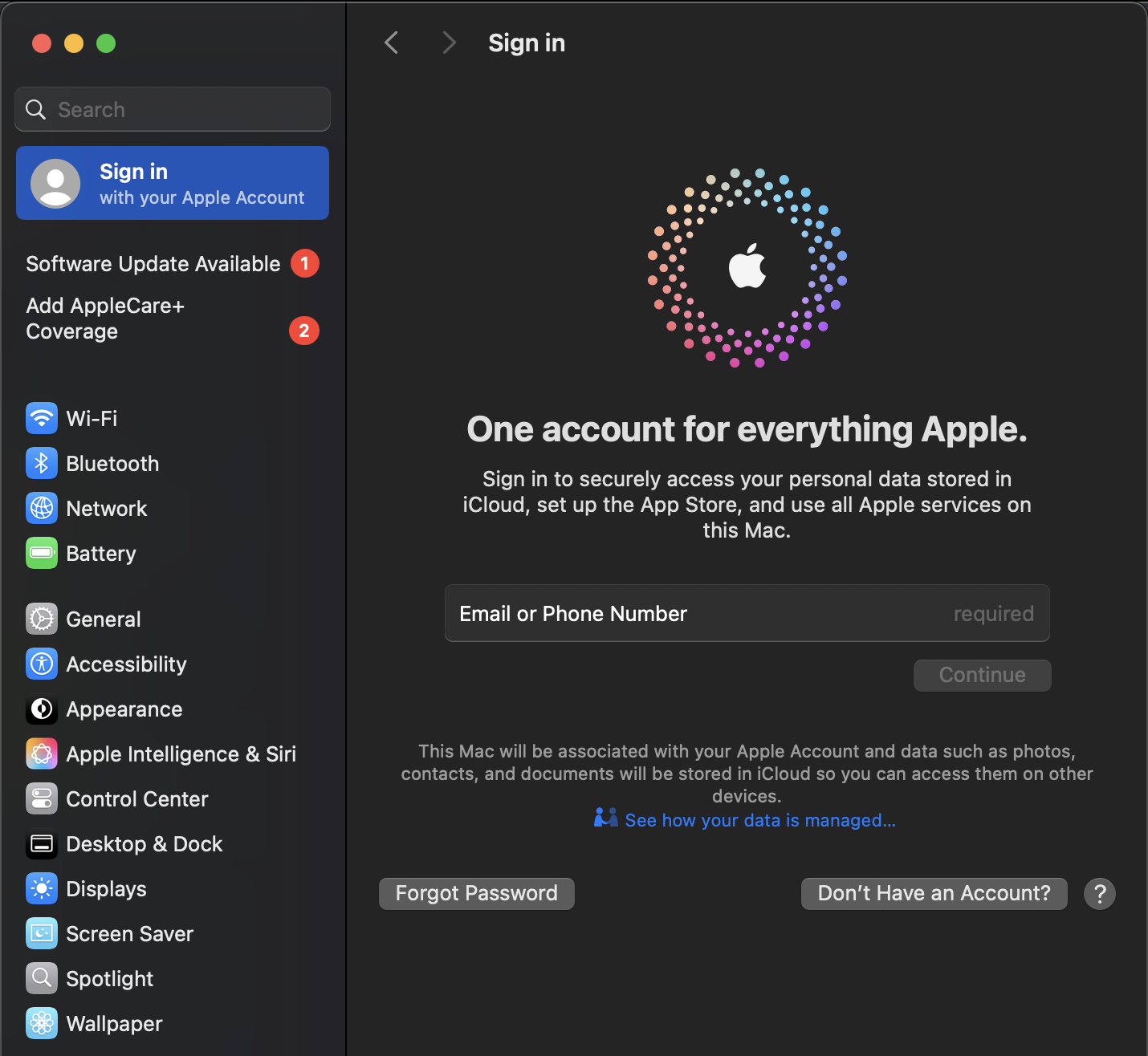
System Settings confirming no Apple account is signed in.
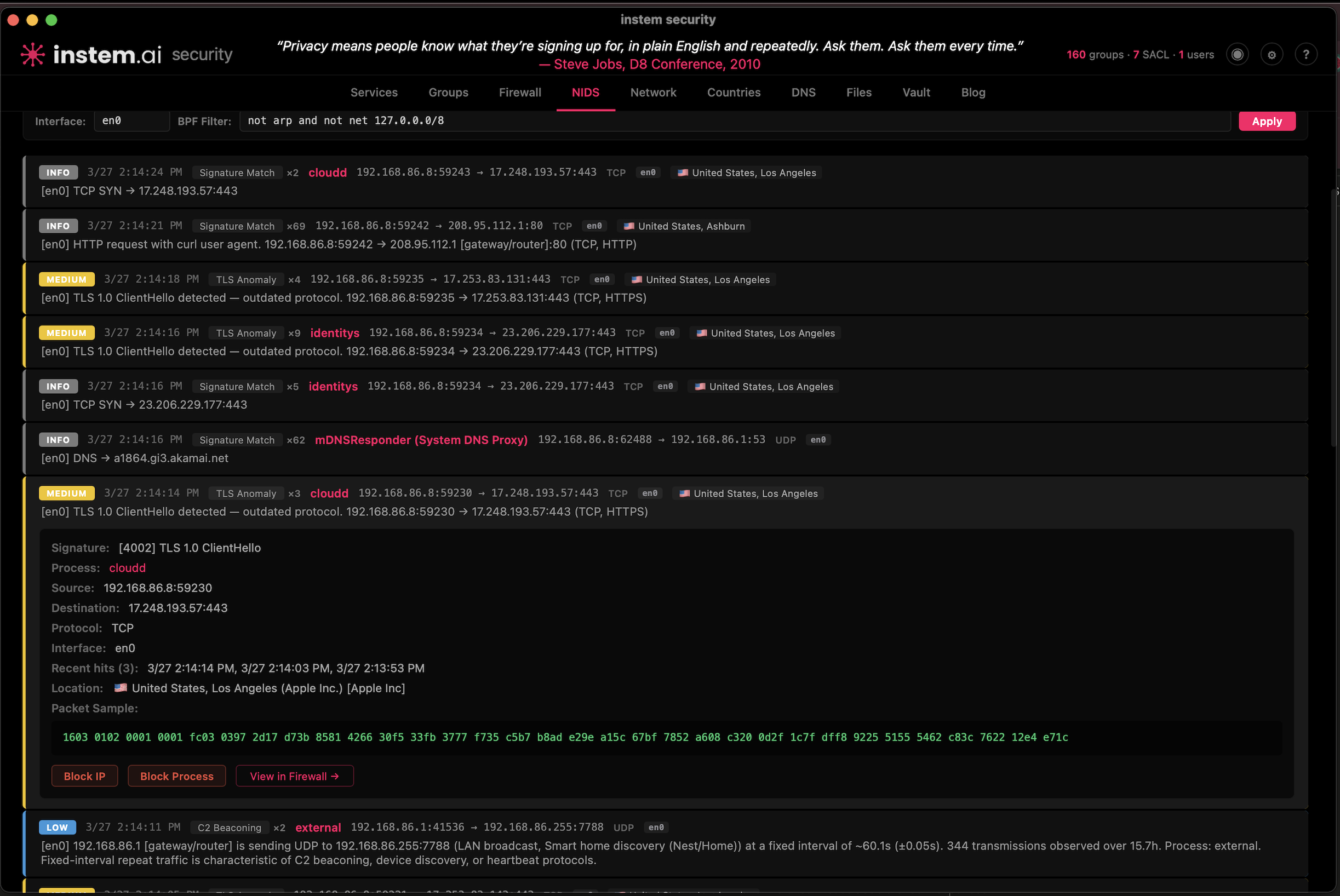
instem.ai security monitor: cloudd making active TLS connections to Apple servers with no Apple Account on this machine.
22 minutes after a cold boot, with no user action beyond login:
  518 _locationd   Thu Mar 26 12:29:23 2026   com.apple.geod
  723 roipipe      Thu Mar 26 12:29:24 2026   callservicesd
  907 roipipe      Thu Mar 26 12:29:25 2026   networkserviceproxy
95039 roipipe      Thu Mar 26 12:53:28 2026   cloudd
95144 roipipe      Thu Mar 26 12:53:28 2026   identityservicesd
95294 _locationd   Thu Mar 26 12:53:30 2026   locationd
95308 roipipe      Thu Mar 26 12:53:30 2026   routined
95334 root         Thu Mar 26 12:53:30 2026   contextstored
95347 roipipe      Thu Mar 26 12:53:30 2026   contactsd
callservicesd started at 12:29:24. networkserviceproxy at 12:29:25. Both launched during the boot sequence, before the user-level daemons even initialized. contextstored is running as root. No iCloud account attached. No user consent given. Every daemon active.
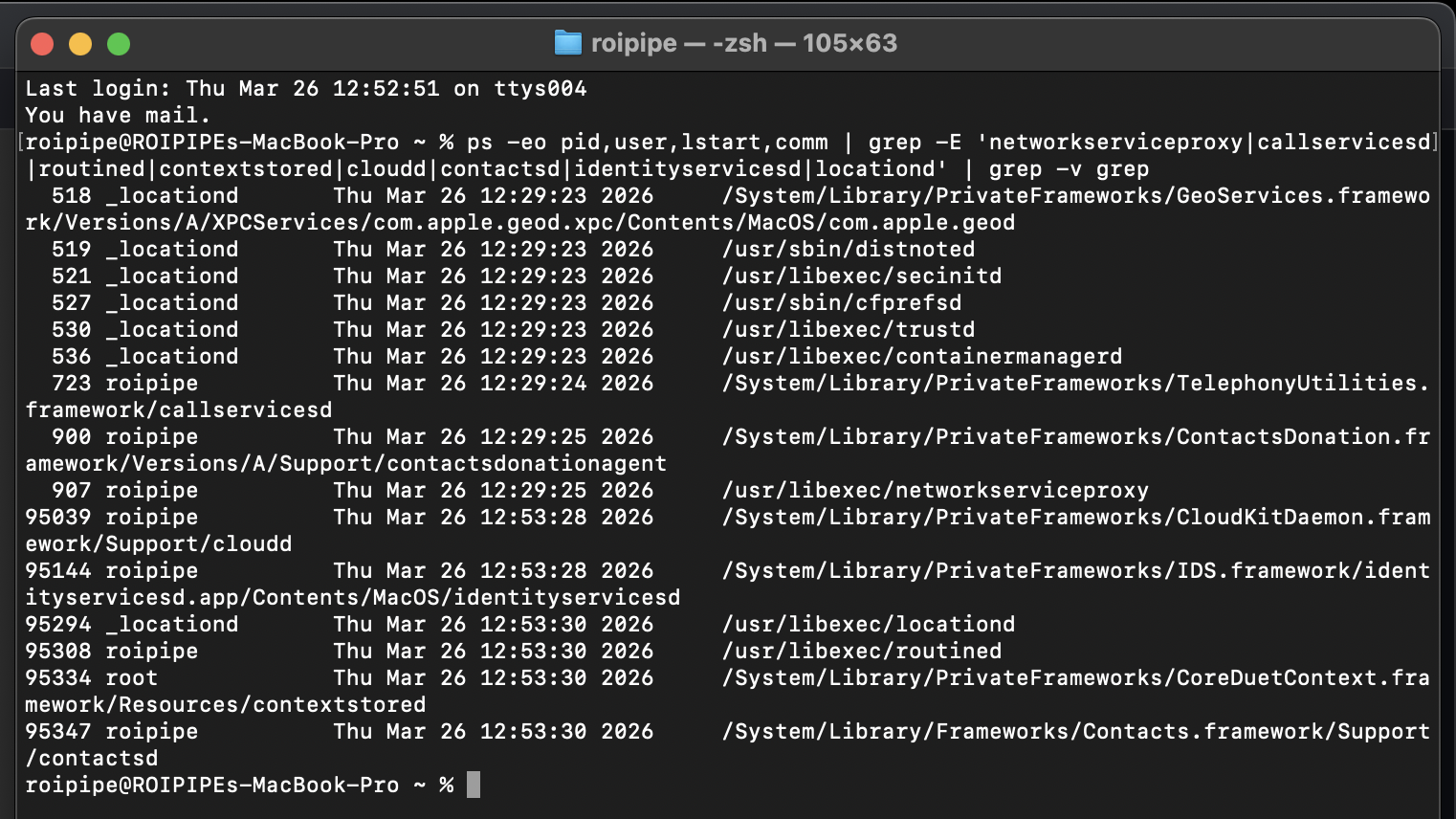
Fresh boot, no iCloud account: every data collection daemon running. callservicesd and networkserviceproxy launched at boot before user session daemons.
The infrastructure does not depend on your iCloud account. It does not depend on your consent. It starts at boot and it runs until you power off the machine.
The Disable Attempt
We tried every path Apple provides to disable these services.
User domain, no sudo:
$ launchctl disable gui/501/com.apple.networkserviceproxy
(no error)
Service kept running. Same PID. No effect.
System domain, with sudo:
$ sudo launchctl disable system/com.apple.networkserviceproxy
(no error)

$ sudo launchctl disable system/com.apple.contextstored
(no error)
Both accepted silently. Both services kept running. We checked the system domain:
$ sudo launchctl list | grep networkserviceproxy
(nothing returned)
networkserviceproxy was never registered in the system domain. The sudo command targeted a domain where the service does not exist. Apple accepted it without error. No warning that the target was invalid. Silent acceptance of a useless command.
Then we rebooted.
$ ps -eo pid,user,comm | grep -E 'networkserviceproxy|contextstored'
  910 roipipe   /usr/libexec/networkserviceproxy
 1980 root      contextstored
Both back. New PIDs. We checked whether the disable flag persisted:
$ launchctl print-disabled gui/501 | grep networkserviceproxy
(nothing returned)
The disable flag was wiped on reboot. Apple discarded it.
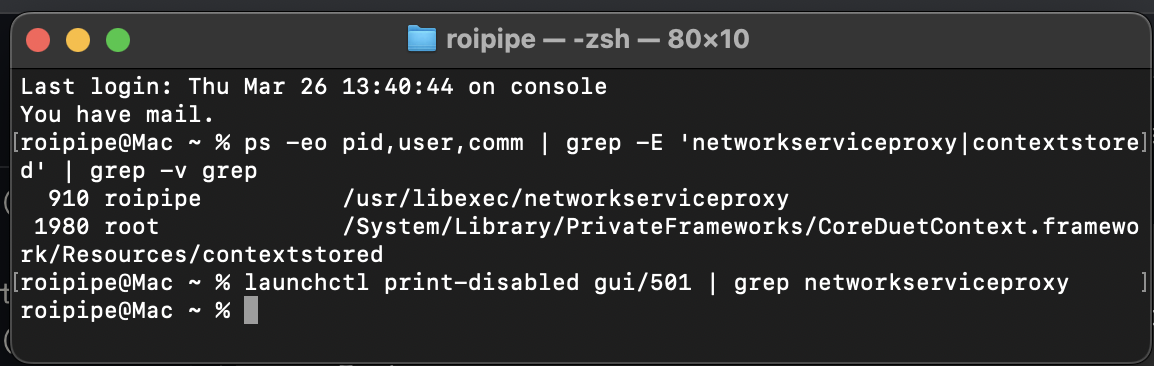
Post-reboot: both services running with new PIDs. launchctl print-disabled returns nothing. The disable flag was erased.
The full sequence: we issued disable commands in both the user domain and the system domain. Every command was accepted without error. The services continued running. After reboot, both services restarted with new PIDs and the disable flags were gone from the registry.
This is worse than blocking the command. SIP gives you an honest error. This gives you silence. The command exists. It runs. It returns success. It does nothing. And on reboot, even the record that you tried is erased.
The Command That Tells the Truth
There is one more command. launchctl bootout attempts to actually stop and unload a service.
$ launchctl bootout gui/501/com.apple.routined
Boot-out failed: 150: Operation not permitted while System Integrity Protection is engaged

$ launchctl bootout gui/501/com.apple.networkserviceproxy
Boot-out failed: 150: Operation not permitted while System Integrity Protection is engaged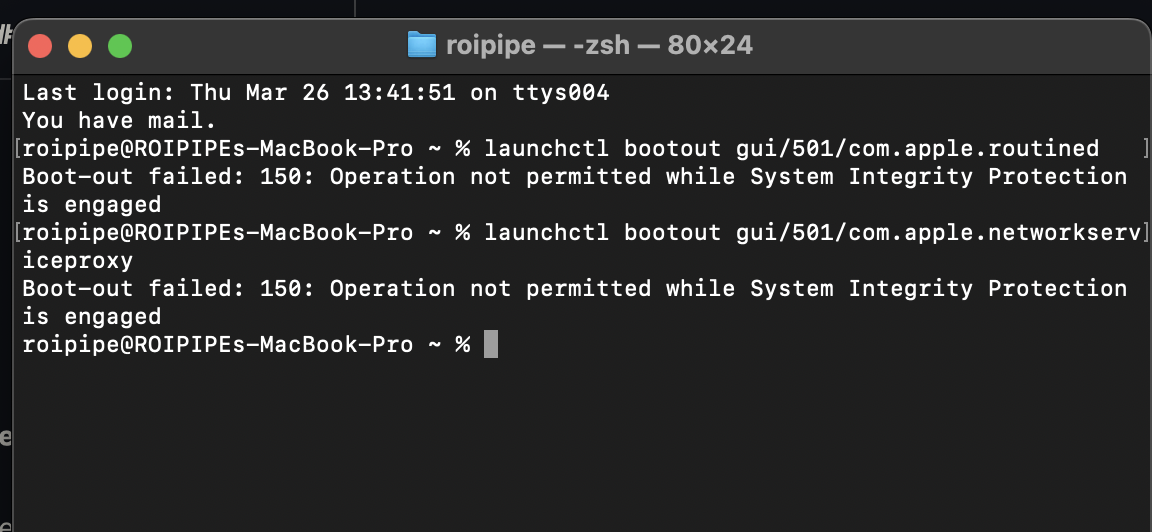
Both routined and networkserviceproxy are protected by System Integrity Protection. You cannot stop them.
Both SIP-protected. The behavioral data collector and the proxy that transmits it are guarded by the same security layer designed to protect your system from malware.
Apple gave you two commands. launchctl disable pretends to work. It accepts your input, returns no error, and erases the record on reboot. launchctl bootout tells you the truth: these services are untouchable without entering Recovery Mode and disabling your system’s core security model.
To stop the collection, you would have to disable the protection Apple built to keep your Mac secure from attackers. That is the trade-off. Apple made the behavioral data infrastructure and your system’s security depend on the same mechanism. You cannot remove one without removing the other.
What Is Still Running
With the daemons back and no iCloud account signed in, we checked what each one was actually doing.
networkserviceproxy:
$ lsof -i -n -P | grep networkserviceproxy
(nothing returned)
No active network connections. The proxy is running but idle. With no iCloud account, it has nowhere to send data. We are not going to claim otherwise.
contextstored:
$ lsof -c contextstored | grep -E '\.db|\.sqlite'
(nothing returned)
No database files open. Running but idle.
routined:
$ lsof -c routined | grep -E '\.db|\.sqlite'
Cache.sqlite          847,872 bytes   WAL: 90 KB
Cloud-V2.sqlite         4,096 bytes   WAL: 947 KB
Local.sqlite            4,096 bytes   WAL: 873 KB
SafetyCache.sqlite      4,096 bytes   WAL: 939 KB
All four databases open. All four actively being written to. The write-ahead logs tell the story:
Cloud-V2.sqlitehas a 947 KB write-ahead log. This is the cloud sync database for your behavioral routine model. It is accumulating data with no iCloud account signed in.Local.sqlitehas an 873 KB WAL. Your local pattern-of-life model, actively growing.SafetyCache.sqlitehas a 939 KB WAL. Safety and location caching, actively written.Cache.sqlitehas a 90 KB WAL. General behavioral cache.
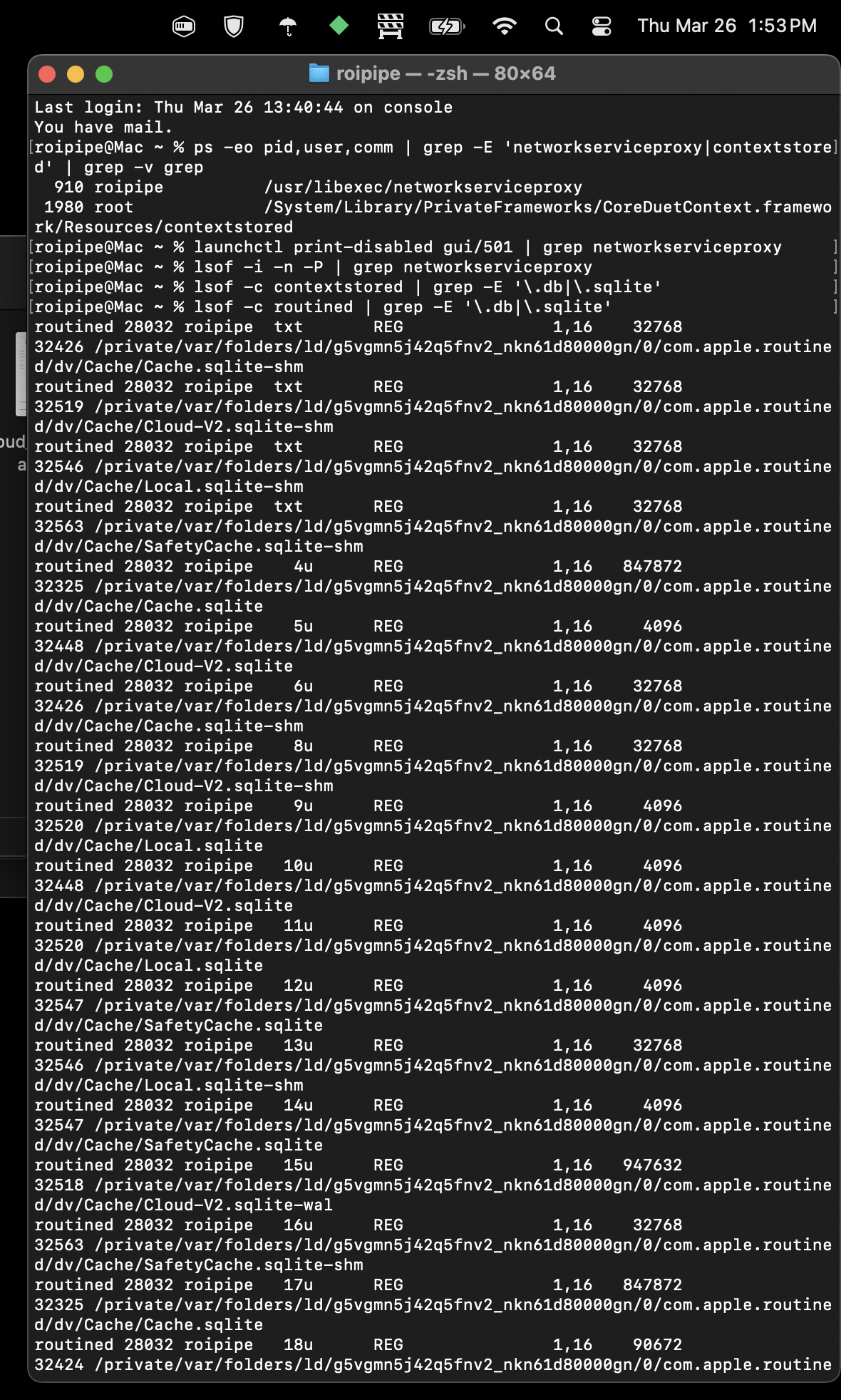
Raw lsof output: routined with all four behavioral databases open and actively written to. No iCloud account signed in.
routined does not need an iCloud account to collect your behavioral data. It does not need your permission. It does not need any service enabled. It records where you go, when, and how often, and it writes that data to a cloud sync database regardless of whether there is an account to sync it to.
The collection never stops. The pipe waits. The moment you sign back into iCloud, that data is queued and ready to transmit through networkserviceproxy to the no-PTR endpoint on Apple’s infrastructure.
What This Means
The sequence of events is documented and timestamped:
- User explicitly disabled individual iCloud services.
Enabled = 0confirmed in Apple’s own config file. - User signed out of iCloud entirely.
- Infrastructure continued operating on user-owned hardware.
- Daemons auto-restarted within seconds of signout and persisted through a full reboot.
- Disable commands accepted silently across both launchd domains with no effect.
- Disable flags erased on reboot.
- Bootout commands blocked by System Integrity Protection. Both
routinedandnetworkserviceproxyare SIP-protected. - Behavioral data collection continued with no account signed in. Cloud sync database actively written to, queuing data for future transmission.
The hardware is privately owned. The service was explicitly declined. Every disable mechanism Apple provides was used. The one that pretended to work was erased on reboot. The one that would actually work is blocked by SIP. Behavioral data collection continued regardless.
This is not a terms of service dispute. This is unauthorized code executing on privately owned hardware after explicit service refusal. The disable mechanism is theater. The real protection is SIP. The evidence infrastructure is deliberately obfuscated through no-PTR endpoints, IPC routing that bypasses firewall visibility, and stderr piped to /dev/null.
The Only Remediation
Short of entering Recovery Mode, disabling SIP, and manually unloading system services, the only practical mitigation is a firewall that blocks at the process level.
LuLu by Patrick Wardle. Block networkserviceproxy, callservicesd, cloudd, routined, and contextstored permanently. These processes can run. They just cannot phone home.
The longer remediation: leave the platform entirely.
Innocent Infrastructure Does Not Need to Hide
A developer signed out of iCloud on his own hardware. Every daemon that serves Apple’s data collection infrastructure restarted within seconds. Two of them never stopped at all. The disable commands Apple provides were accepted silently and erased on reboot.
This machine was used to run businesses. It processed client data, campaign strategy, proprietary attribution architecture, and legal research. All of it was accessible to an infrastructure layer the user could not stop, could not fully see, and could not remove without compromising the operating system’s own security model.
The thing that should bother people most is not even the data collection. It is that Apple built an entire obfuscation architecture around it. No PTR records. Stderr to /dev/null. IPC routing that bypasses firewall visibility. Services with no opt-out exposed in the UI.
Innocent infrastructure does not need to hide.
You signed out. They stayed in.
In Plain English
If you skipped the technical parts, here is what we found.
Your Mac runs hidden background programs that track your behavior. Where you go. When. How often. What apps you use. Your contacts, your call history, your location. These programs start the moment you turn on your computer. They run whether or not you are signed into iCloud.
We turned off every Apple service we could find. We signed out of our Apple account completely. We restarted the computer. Every single tracking program came back on its own.
We then used Apple’s own tools to try to turn them off. Apple gives you two commands for this. The first one ran without any errors, as if it worked. It did not. The programs kept running. When we restarted, even the record that we tried was erased. The second command told us the truth: these programs are protected by the same security system (SIP) that protects your Mac from viruses. You literally cannot stop them without disabling your computer’s security.
While all of this was happening, one of these programs was still recording our daily routine into a file called Cloud-V2.sqlite. That file is designed to sync to Apple’s servers the moment you sign back into your Apple account. So even while you are signed out, it is collecting data and saving it for later.
All of this data gets sent through a single hidden channel to an Apple server that was deliberately set up so it cannot be identified through normal network lookups. Your firewall cannot see which programs are sending data. It only sees the one channel. Apple designed it that way.
There is no setting in System Settings to stop this. There is no toggle. The only way to block the data from leaving your computer is to install a third-party firewall and manually block the programs by name, which breaks iCloud entirely. To stop the collection itself, you would have to disable the security system Apple built to protect your Mac, which leaves you vulnerable to actual threats. Apple tied its surveillance infrastructure to your security. You cannot remove one without removing the other.
You bought the hardware. You pay for the software. You turned everything off. It kept running anyway.
Comments
No comments yet. Be the first to share your thoughts.
Leave a Comment
Commented before? to skip the form fields.
Sign in
Enter the 6-digit code sent to
We sent a 6-digit code to