“Privacy means people know what they're signing up for, in plain English and repeatedly. Ask them. Ask them every time.”
Steve Jobs, D8 Conference, 2010
That was his last major public interview before he died.
Tim Cook the CEO of Apple picked it up. Year after year. “Privacy is a fundamental human right.” WWDC. Brussels. Congress. Every keynote. Every press release. Built the entire Apple brand around it.
Steve Jobs meant it. I ran a security audit on my Mac today. What I found raises serious questions about whether the people running his company now feel the same way.
The Discovery
I'm a software developer. I own a company. I run a corporate workstation. macOS Sequoia, 128 GB of RAM, used exclusively for proprietary software development. I also run advertising. Pixels, behavioral targeting, device fingerprinting, conversion APIs, retargeting, lookalike audiences. I work in the data business every day. I understand tracking. I am not anti-tracking. There is a clear line between tracking what someone does on your own website vs scanning what someone creates. What I found on my machine is not tracking. It is something else entirely.
My machine runs at full steam. I run AI for many processes and was trying to figure out why I wasn't getting all the processing power my hardware could give. I opened Activity Monitor. Found 9 GB of my RAM being eaten by a process called mediaanalysisd. A process I never started. Never agreed to. Didn't know existed.
I was actively writing code. Building cutting-edge AI technology. And Apple's undisclosed process was scanning the same files in real time. My work. My intellectual property. While I was creating it.
Apple's process. Running machine learning on files stored on my machine. Face detection. Object classification. Scene analysis. OCR. Starts on every boot. No toggle in System Settings. No notification. Kill it and it respawns. The only way to stop it is a Terminal command Apple never told anyone about.
Full User Permissions
mediaanalysisd runs as your user account. Not as a restricted service. Not in a sandbox. As you. That means it has the exact same file access you do. Every folder. Every file. Your entire home directory. Apple could have isolated this process under a restricted account with access limited to the Photos library. They chose not to.
So it wasn't limited to my Photos library. It had access to my entire home directory. Every folder. Every file. Since the day I set up the machine.
Because it runs as my user account, it has full read access to my Sites folder. The directory where I develop proprietary software for my company. Production source code. Client applications. Database schemas. Architecture documents with business strategy. API keys. SSH private keys. Shell history. Contracts. Financial records. Browser cookies. Saved passwords. Email databases. Personal photos. All of it sitting in directories that Apple’s undisclosed ML process has permission to read.
This process was consuming 9 GB of RAM. You don’t use 9 GB by sitting idle. You use 9 GB by actively pulling files into memory and running ML models on them. What exactly is it processing? What files is it reading? 9 GB of active processing on a corporate machine full of proprietary business files. Those are reasonable questions. Apple has never answered them.
And that's just what I caught the first time I looked. One snapshot. One afternoon when my machine was slow and I happened to check. This process has been running on every boot since the day I set up this machine. How many times has it scanned my files? How much data has it processed over months or years of running silently in the background? I'll never know. Nobody will.
9 GB. While they stood on stage talking about privacy being a fundamental human right.
Others Have Caught This Too
I'm not the first person to find this. Jeffrey Paul, a cybersecurity researcher, found mediaanalysisd making network connections to Apple servers in January 2023. Apple quietly patched it in macOS 13.2. A Medium article called the network traffic “a bug” and declared the issue “debunked.” That same article ends by recommending people install a third-party firewall to monitor Apple's own processes. If there's nothing to worry about, why do I need a firewall to watch what Apple is doing on my own machine?
In June 2025 a developer documented mediaanalysisd scanning 675 files inside his developer directory. Image files inside developer project folders. Thumbnails, screenshots, favicons buried in project trees. 1.6 million log lines. The process was scanning his development directories over and over, throwing errors and never stopping. It was crawling through project directories because it runs with full user permissions.
On Apple's own support forums, users are reporting this process filling entire SSDs. 15 GB. 50 GB. 80 GB. 140 GB of cache data generated by mediaanalysisd. On their machines. Without their knowledge.
Everyone is treating this as a performance bug. Nobody is asking the right question. Where does the analysis data go when iCloud is enabled?
And if you search “mediaanalysisd” right now, Google's AI Overview tells you it's a “background process that analyzes photos and videos for the Photos app.” Nothing about full user permissions. Nothing about scanning developer directories. Nothing about the 9 GB of RAM. Nothing about iCloud sync pathways. The sanitized version.
It's Not Just Apple
I uninstalled Docker Desktop weeks ago. Deleted it from Applications. Today I found 17 Docker processes still running on my machine. Seventeen. Including an AI agent called cagent. Docker's Gordon AI. Actively communicating with ai-backend-service.docker.com. Phoning home to Docker's servers on software I already deleted. It survived the uninstall. No cleanup. No notification. Just 17 zombie processes running as my user account with full access to my files.
The 755 Problem
On top of all of this, macOS sets every user-created directory to permission code 755 by default. That means even if a process is not running as your account, it can still read your files. System services. Helper tools. Other user accounts. Every non-sandboxed app on the machine. Apple ships this default on every Mac sold worldwide and hides it behind a Finder UI that shows “Read & Write” instead of the actual permission code. You'd have to open Terminal and run ls -la to find out the truth.
So mediaanalysisd can read everything because it runs as you. And every other process on the machine can read everything because of 755. Two layers of exposure. Zero disclosure.
It Took an AI to Stop Their AI
Here is the part that should make you uncomfortable. I could not figure out what this process was doing on my own. Apple does not document mediaanalysisd. There is no man page. No disclosure in System Settings. No explanation anywhere in their UI. The process is part of a private framework called MediaAnalysis.framework that Apple has never publicly documented.
I had to use an AI coding assistant to investigate Apple's own AI. I had it trace the process, identify the framework, read the binary metadata, pull the system logs, document the evidence, and find a way to kill it. I had iCloud turned off for files. iCloud Photos off. iCloud Drive off. Desktop & Documents sync off. The only cloud services I kept active were email, contacts, and SMS. None of which have anything to do with scanning local files. And their process was still running. Still scanning my proprietary source code. Every time we killed it, it came back. Every time we disabled it through launchctl, it respawned. We had to hunt it down repeatedly until we found a method that stuck.
Think about that. I did everything Apple tells you to do. I turned off the cloud. I disabled the services. And their undisclosed AI kept scanning my files anyway. The only way to stop Apple’s undisclosed AI process from running on a machine full of proprietary code was to use a different AI to investigate and fight it. A normal user has zero chance of finding this, understanding it, or stopping it. Is that by design? Or is it just negligence? Either way, the result is the same.
Did they get permission to run their machine learning on my local work? The work that feeds my family. The code I write every day to keep my business alive. I was never asked. It was never disclosed. And when I turned off every cloud service related to files, the process kept running anyway.
No Off Switch
I had already disabled iCloud Photos. I had already disabled iCloud Drive. I had already disabled Messages, Mail, Notes, and Find My Mac. Six services explicitly turned off. And mediaanalysisd was still running. Still consuming 9 GB of RAM. Still scanning my files. Disabling the services you think are connected to it does not stop it. Nothing stops it. There is no off switch.
No Informed Consent
I read the macOS Sequoia Software License Agreement. The one you click “Agree” on. Nowhere in it does Apple mention mediaanalysisd. Nowhere does it mention running machine learning on your files. Nowhere does it mention scanning files outside the Photos library. Nowhere does it mention ANSA, their neural scene analysis system. Nowhere does it mention running this process with full user account permissions instead of sandboxing it.
The SLA has a “Consent to Use of Data” section that references Siri, Spotlight, Analytics, and Location Services. Not a word about an ML process consuming 9 GB of RAM to analyze everything on your machine. Their separate “privacy documentation” only mentions analyzing photos and videos for the Photos app. Nothing about scanning files outside the Photos library. Nothing about full user permissions. Nothing about mediaanalysisd. It is not buried in the fine print. It is not disclosed at all.
I never agreed to this. You never agreed to this. There is no informed consent for what mediaanalysisd does.
The Bottom Line
I paid Apple for the hardware. I paid for the OS. I paid for iCloud. And in return, Apple ran an undisclosed ML process with my full user permissions on my proprietary business files, shipped default permissions that make every directory readable by every process on the machine, hid it behind a UI designed to obscure it, provided no way for a normal user to find out or stop it, and never put any of it in the license agreement.
Did I pay them to access my data without my knowledge?
Where Is My Data Going?
Here is what I can't get out of my head. Where is my proprietary information going? And who is doing what with it?
I have no record of what mediaanalysisd produced from my files. I have no record of where that analysis went. I have no record of whether it synced through an iCloud pathway I didn't know existed. I have no record of whether it was used to train Apple Intelligence. I have no record of whether a third party, government or otherwise, has accessed it. Apple has never disclosed any of this. And there is no mechanism to find out.
My proprietary business data went into a process I didn't consent to, and I have zero visibility into what came out the other side. That is a black hole.
Apple is one of the largest AI companies on the planet. They are actively building products that compete across every software category. Is their process generating structured analysis of how real developers architect real applications? My naming conventions, my file structures, my database schemas, my API patterns? If so, that would have direct commercial value to an AI training pipeline. Apple Intelligence was announced in June 2024. mediaanalysisd has been running since at least 2022. Was the infrastructure in place before anyone was told what it was for? I don’t know. But the timeline raises the question.
There is a broader context worth considering. The NSA PRISM program, exposed by Edward Snowden in 2013, named Apple as a participant. FISA court orders compel companies to hand over data and make it illegal to disclose that they have done so. Apple legally cannot tell you if they have received one. A process that generates structured, machine-readable analysis of files on your machine, pre-processed and pre-indexed, would that be useful to a surveillance apparatus? Under current law, if someone required Apple to keep such a process running, Apple would be legally prohibited from telling anyone. I am not saying that is happening. I am saying the architecture would allow it, and the law would hide it.
I cannot prove any of that is happening. But the architecture exists. The legal framework exists. And the disclosure does not. Those three facts together are enough to warrant the question.
I Love Apple. That's Why I'm Furious.
I need to be clear about something. I am not an Apple hater. I'm not switching to Linux. I'm not boycotting anything. I chose Apple because of what Steve Jobs promised. I believed them. I paid them. I built my entire business on their hardware. And what I found on my machine does not match what they promised.
I don't care about the embarrassing stuff. Honestly. Scan my photos. Find whatever you find. I'm a good person and I have nothing to hide. Someone at Apple looking at my personal files is more funny than threatening. I genuinely don't care.
But don't touch the thing that feeds my family.
What's in my Sites folder is trade secrets. Architecture decisions. Competitive strategy. How I build things. How I structure my systems. The patterns and logic that make my business mine. That is intellectual property with real commercial value. And Apple ran a machine learning process with full access to all of it. Without my knowledge. Without my consent. Without any mechanism for me to find out what it did.
If that process accessed any of those files, that is not just a privacy concern. That is someone’s livelihood. And there are legitimate questions about whether this is consistent with the fundamental right to privacy in this country.
Steve Jobs built a culture around protecting the user. He made it the brand. The people running Apple now inherited that trust. Are they honoring it? Or are they spending the credibility of someone who can no longer hold them accountable?
What You Can Do Right Now
Do not run these commands.
I am serious. If you do not know exactly what these commands do, do not touch them. They modify system settings, kill Apple processes, and change file permissions at the root level of your operating system. Photos, Siri, Spotlight, iCloud sync, and other Apple services will stop working partially or entirely. Several of these commands use sudo which grants root-level access. One wrong command with sudo can brick your machine.
Hire a professional. Take your machine to someone who understands Unix permissions, macOS system processes, and what these changes will do to your workflow before you run a single line. I am sharing what I did on my machine so people understand what is happening. Not so people blindly copy and paste commands they don't understand.
DISCLAIMER OF LIABILITY: INSTEM.AI AND ROI PIPE LLC PROVIDE THIS INFORMATION "AS IS" FOR EDUCATIONAL PURPOSES ONLY. BY USING ANY OF THE COMMANDS OR INSTRUCTIONS BELOW, YOU ACCEPT ALL RISK. IN NO EVENT SHALL INSTEM.AI OR ROI PIPE LLC BE HELD LIABLE FOR ANY DIRECT, INDIRECT, INCIDENTAL, OR CONSEQUENTIAL DAMAGES, INCLUDING BUT NOT LIMITED TO LOSS OF DATA, SYSTEM FAILURE, OR DISRUPTION OF SERVICES RESULTING FROM THE USE OR MISUSE OF THIS INFORMATION.
This is not just a developer problem. This is happening to every single person using a Mac. Lawyers with client files. Doctors with patient records. Accountants with financial data. Students. Parents. Small business owners. Anyone who has ever created a folder on a Mac.
Here is what I did on my machine. But before you can see it, you must agree to the terms above.
Final Word
Steve Jobs said ask them. Ask them every time. Make them tell you to stop asking them if they get tired of your asking them.
Nobody asked me. Nobody asked any of us.
I left Windows for Mac because of this exact kind of behavior. Microsoft doesn't even hide it anymore. Windows Recall takes screenshots of everything you do every 5 seconds. Their NPU analyzes every screenshot and stores a searchable database of your entire activity history. Copilot, their cloud AI, can query that history from an external server. Telemetry you can't fully disable. OneDrive that auto-enables and moves your files to their cloud.
I switched to Mac because Apple said they were different. Because Tim Cook stood on stage and said privacy is a fundamental human right.
Are they really any different? Or do they just say they are?
I am not angry because of what Apple may or may not have done with my files. I am angry because I trusted them, and what I found does not match that trust. I chose them. I defended them. I told people they were the safe choice. And the whole time, an undisclosed machine learning process with full access to everything I have ever built was running on my machine.
I still love the hardware. I still love what Steve Jobs created. But the people running Apple now need to answer some questions. What was extracted from my files? Where does the analysis data go? Who has access to it? What is it used for? Until those questions are answered, the trust is gone.
Ask me. Ask all of us. That's all we ever wanted.
Update, March 16, 2026
It's still happening.
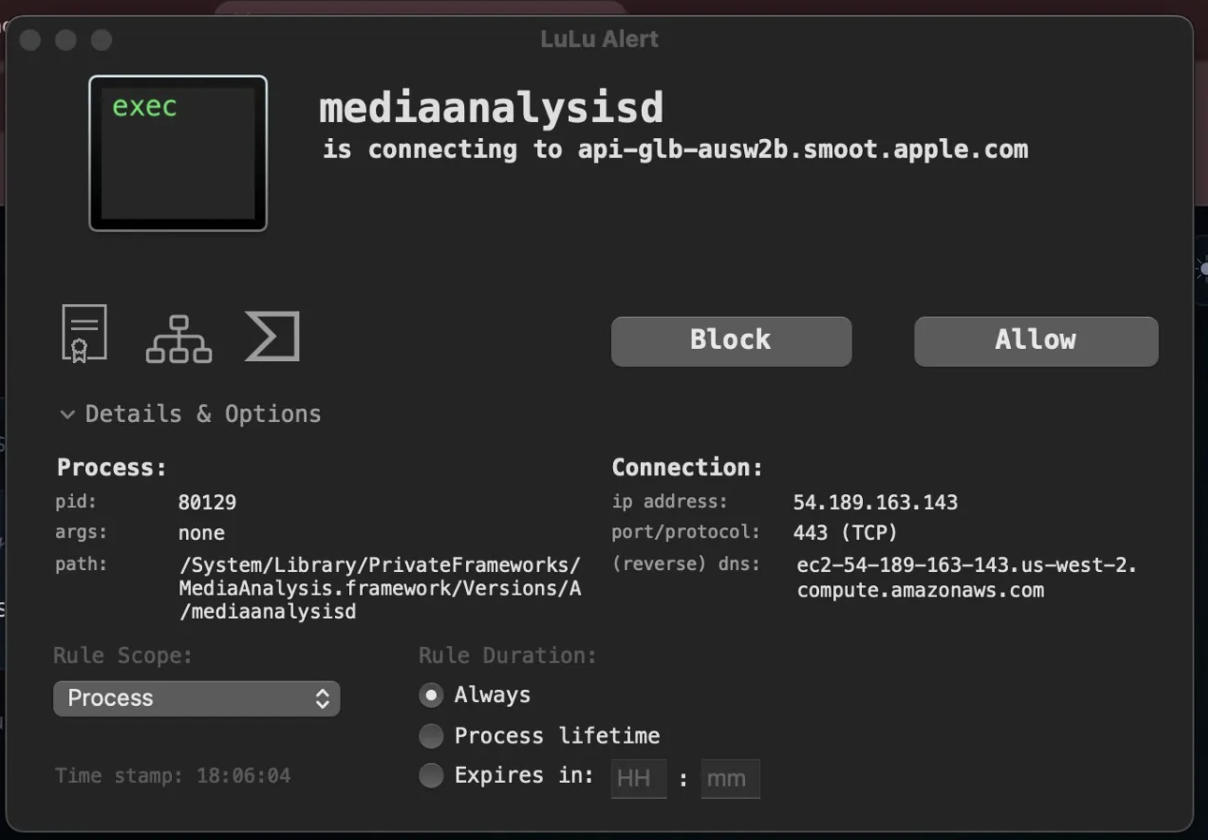
LuLu, the macOS application firewall I run on this machine, caught mediaanalysisd attempting an outbound connection this week. The destination: api-glb-ausw2b.smoot.apple.com. Smoot is Apple's internal analytics and telemetry platform, named after a unit of measurement they use internally. This is not a functional service endpoint. It exists to collect data.
The reverse DNS on the destination IP resolves to ec2-54-189-163-143.us-west-2.compute.amazonaws.com. Apple's telemetry infrastructure runs on Amazon's cloud. Your data doesn't stay on Apple-owned servers.
Process path confirmed: /System/Library/PrivateFrameworks/MediaAnalysis.framework/Versions/A/mediaanalysisd. Same undisclosed binary. Same full user permissions. Still running. Still trying to phone home.
I have not updated macOS since the original article. That means the launchctl disable command I ran did not hold. Apple's system actively re-enabled it without an OS update. Something on this machine, another daemon, a watchdog process, some mechanism Apple has never disclosed, is resurrecting mediaanalysisd after it has been explicitly disabled by the user. You cannot just kill it and walk away. Apple is actively working to keep this process running on your machine.
The "It Was Just a Bug" Narrative
When Jeffrey Paul first caught mediaanalysisd making network connections to Apple servers in January 2023, the tech press rushed to bury it. Within ten days, a coordinated wave of articles declared the whole thing debunked.
Pawel Szydlowski published a Medium article titled "Debunked: The Truth about mediaanalysisd" on January 27, 2023. Cult of Mac ran "No, Apple isn't spying on the files in your Mac." Side of Burritos called Paul's findings a case study in "fear, uncertainty, and doubt." Nick Heer at Pixel Envy titled his piece "Everybody Panic" and called Paul's claims irresponsible speculation. Hacker News flagged the original post. The narrative was set: empty network call, just a bug, already patched in macOS 13.2, nothing to see here.
Here is what every single one of those articles got wrong. The network call was never the issue. The issue is that Apple is running an undisclosed machine learning process with full user permissions that scans every file on your machine. The "fix" in macOS 13.2 stopped the network call from being intercepted. It did not stop the scanning. It did not stop the process. It did not add a toggle. It did not add disclosure. It did not add consent. Apple patched the part that got caught and left everything else running.
Apple never issued a statement. Not one word. The entire "it was a bug" narrative was constructed by third-party bloggers and tech publications. Apple said nothing, patched the network call, and let the press do the rest. Every one of those publications gave Apple cover for a process that is still running on every Mac sold worldwide three years later.
Follow the money. Cult of Mac is owned by Leander Kahney, a former Wired editor who built his entire career writing books about Apple. Their revenue comes from Apple affiliate links, a commerce partnership with StackCommerce that generates 100x their original affiliate income, and advertising sold to an audience of Apple enthusiasts. Every dollar they earn depends on people buying Apple products. Writing that Apple is running undisclosed surveillance on your machine does not sell MacBooks. So they wrote the opposite. The other publications that ran "debunked" headlines operate in the same ecosystem. Their audiences are Apple users. Their content is about Apple products. Their business models, affiliate commissions, sponsorships, ad revenue, depend on Apple's reputation staying intact. Negative Apple coverage does not just lose readers. It loses income. That is the incentive structure behind every "nothing to see here" article written about mediaanalysisd.
And it got worse. After macOS Sequoia shipped, users on Apple's own support forums started reporting mediaanalysisd filling their drives. 15 GB. 50 GB. 80 GB. 140 GB of cache data. One user found the cache folder contained symlinks to their entire user directory. The process was scanning everything, not just photos. Another reported 300 GB of disk writes per day. Enough to kill their SSD. And it did. In June 2025, a developer ran log stream on mediaanalysisd for three hours and captured 1.6 million log lines. Sixty percent were errors. The process was scanning the same 675 files thousands of times per hour and never stopping.
Four major macOS releases. Ventura. Sonoma. Sequoia. Tahoe. No fix. No documentation. No man page. No off switch. launchctl disable does not hold because the disabled entry does not remove the enabled entry. Kill the process and a watchdog daemon brings it back within ten seconds. The only way to truly stop it requires permanently disabling System Integrity Protection, which compromises your entire system's security. Apple made it so the only way to protect your privacy is to destroy your security. That is not a bug. That is a design decision.
To every publication that ran a "debunked" headline in January 2023: the process you told people not to worry about is still running. It is still scanning files it has no business touching. It is still consuming resources. It is still impossible to disable. And it is still undisclosed. You owe your readers a correction.
What Happened to the Company That Fought the FBI?
In 2016, Apple told the FBI no. A federal court ordered Apple to build a backdoor into iOS to unlock an iPhone used in the San Bernardino shooting. Apple refused. Tim Cook published an open letter calling it "an unprecedented step which threatens the security of our customers." Apple argued that building a tool to bypass encryption on one phone would compromise every phone. They went to war with the United States government over the principle that your device is yours and nobody, not even law enforcement with a court order, should be able to break into it.
That was ten years ago. The same company is now running an undisclosed machine learning process with full user permissions that scans every file on your machine, resurrects itself when you kill it, phones home to telemetry servers hosted on Amazon's cloud, and has no off switch. They fought the FBI to protect the principle that no one should have a backdoor into your device. Then they built one themselves.
They did not lose the direction. They abandoned it. The FBI case was good PR. What is running on your machine right now is the actual policy.
I am not anti-government. I am not anti-intelligence. I love this country. I built my business here. I pay my taxes here. I wake up every day grateful that I live in a place where I can build something with my own hands and nobody can take it from me. That is what America is.
But there is a Constitution. The laws this country was founded on are not suggestions. They are not flexible guidelines that bend when the technology gets complicated. The Fourth Amendment does not expire because your papers are now stored as bits on a hard drive instead of parchment in a desk drawer. The right to be secure in your persons, houses, papers, and effects is not negotiable. It is the law. It is the foundation. And it is being broken.
How do we solve these problems without giving unlimited access to every law-abiding citizen’s livelihood in the United States? I would love to hear your opinion in the comments below.
I blocked it permanently.
If you don't have LuLu installed, it's free and open source. It will show you exactly what your machine is doing behind your back.
I also built a free tool called instem os-groups that exposes the 150+ hidden groups macOS uses to control access to remote services like SSH, screen sharing, and file sharing. System Settings shows you two. The rest are invisible.
I am asking you Tim Cook @tim_cook directly, where is our data going and what is Apple doing with it?
Update, March 18, 2026
After further reflection and research I want to be clear about something. Tim Cook may be operating with his own arm being torqued. National Security Letters come with mandatory gag orders. FISA Section 702 can compel technical assistance from companies like Apple with zero public disclosure. The engineers who build these systems may not even know the full reason they were told to build them.
This isn't necessarily Tim Cook's choice. This may be the government compelling Apple under legal mechanisms that make disclosure a criminal act. That changes the conversation. The question isn't just where is our data going. The question is who is compelling Apple to send it and why.
@tim_cook if your hands are tied, say nothing. We'll understand. And we'll build the alternative ...till our arms are torqued as well.
Comments
No comments yet. Be the first to share your thoughts.
Leave a Comment
Commented before? to skip the form fields.
Sign in
Enter the 6-digit code sent to
We sent a 6-digit code to